Monday, March 31, 2014

When Marketing Budgets Hugely Exceed Those of QA: Thoughts Triggered by Yet Another Bug-Ridden Applicant Tracking System

If advertisers spent the same amount of money on improving their products 
as they do on advertising, they wouldn't have to advertise them.
Will Rogers

Around 2008, I became interested in Applicant Tracking Systems or, rather, what I thought back then an ATS should do and how it should do it. I even toyed with the idea of developing my own, but the interest must have been not strong enough for this idea to go beyond a modest in-house working prototype used to train students. I am still interested in this type of software applications, which now manifests itself mostly in what I call a recurring irresistible itch to find bugs in them (Once a Software Tester, Always a Software Tester). So, here is one for your... amusement.


Let's say you are an employer using an ATS from a reputable SaaS (software as a service) provider.

A job seeker visits your web site, goes to its career section and from there is taken to your ATS.
    Note: Technically, it isn't really your ATS since you just "rent" a "slice" on a multi-tenant ATS provided by a SaaS vendor. The applicant may or may not be aware of the fact that he/she is using third-party software, which depends, among other things, on how tightly the ATS is integrated into your web site and how familiar with this type of systems he/she is.
The candidate registers, begins the job application submission process and, a few minutes later, sees something like this:


Screenshot 1 (click to enlarge)


In case you didn't get it, let me show you another one. The screenshot below is from the site of another company, but the ATS SaaS provider and the bug are the same (pay attention to where the red arrows are pointing):


Screenshot 2 (click to enlarge)

Friday, February 28, 2014

Recruiter Spam (and Some Labor Statistics)


There are multiple varieties of recruiter/sourcer spam, but one of my "favorite" is when the e-mail begins with "Our records indicate that you are an IT professional..." followed by a copy-pasted job description that usually is not even remotely related to what I am qualified to do. More often than not the job description is pretty skimpy and/or vague, which is even more annoying.

    Being a naturally curious type, I decided to find out how many people in this country the phrase "IT professional" applies to.

Saturday, January 25, 2014

IT-Averse Senior Management? There's a Workaround for That

Last week, I was talking to someone, and - totally unexpectedly - two situations I had completely forgotten about resurfaced in my memory.


Situation #1

Quite a few years ago.

I am sitting in the office of an old friend of mine, who owns and runs a successful business. His company is larger than what in Europe they call a "medium-sized enterprise", but not huge. As a person, he is, quite possibly, the nicest businessman I've ever met. You should see how courteous he is with the cleaning lady... but I digress...

So, we are sitting in his office chatting about his business. He is telling me about some of his challenges, and I am throwing ideas (naturally, the IT kind) back at him - just to keep the conversation going. Even though I am careful enough not to get too technical, I can tell by the look on his face that he does not understand much of what I am saying. Then, looking a little embarrassed, he confesses that all of it is totally over his head, that he "hardly knows anything about computers", and that he only occasionally uses his "obscenely expensive, but mostly useless, laptop to send personal e-mails".

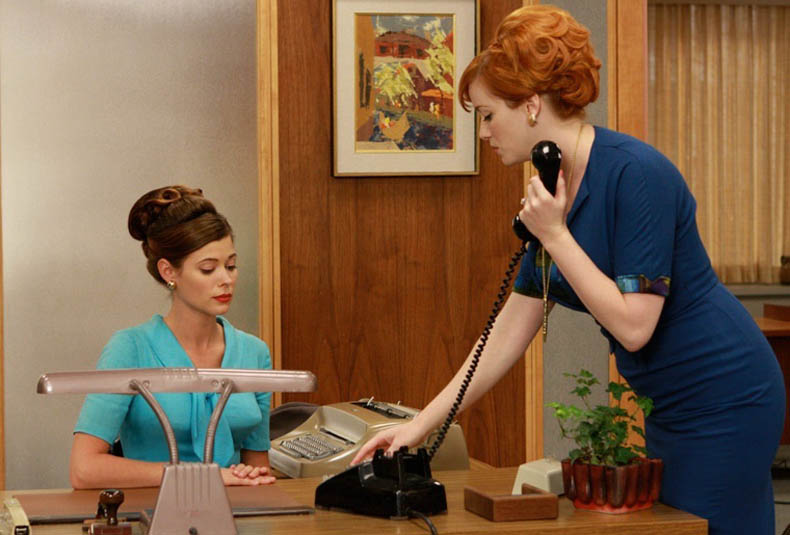
As tactfully as I only can, I inquire if this (I can barely stop myself from using the word "disability") complicates his professional life. "Not at all," he replies cheerfully. "At work, I have a girl for that," he adds pointing at the door behind which is the office of his administrative assistant.

This was before AMC's Mad Men. Otherwise, I would have thought I was at Sterling Cooper.

Image from The Watcher, a Chicago Tribune TV blog by Maureen Ryan


Image from AMC Blogs

    Note: In order to be completely objective, I have to explain that, in the country where this conversation took place, the word "girl", although not entirely appropriate in workplace context, did not sound as terribly politically incorrect as it would have in the U.S.

Saturday, November 2, 2013

How to Create a CentOS 6 Minimal Virtual Machine with VMware Player

UPDATE: This tutorial was written for CentOS 6. Creation of a CentOS 7 minimal virtual machine is very similar, but there are some differences. For CentOS-7-specific instructions, see CentOS 7 Minimal on VMware Player.


Today, a lot of pre-built VM images for specific purposes (e.g., LAMP, Drupal, Moodle, Joomla, etc.) are available. They can save a ton of time since you don't have to start from scratch (assuming, of course, that the images come from a reputable source). However, bear in mind that whoever builds those images always makes certain assumptions. For example, it is almost always assumed that in a LAMP stack the web server and the database server should be on the same virtual machine, which may or may not be what you want. Of course, you could take two identical LAMP images, remove the MySQL-related software packages from the first and all the Apache-PHP-related packages from the second and make the two work together. Still, starting from scratch is also an option, and in some cases (when the requirements of your application are very unique) the best option.

There may be a whole bunch of specific reasons why one would want to start with a minimal installation of an operating system, so I am not going to speculate about those, but, generally speaking, it allows to avoid software bloat and, therefore, maximize utilization of resources and reduce security risks. Bear in mind that minimal installs of most Linux distributions are just that - just enough OS to boot the system or slightly more. So, in order for it to actually do something useful, you will have to install additional software (again, what software to install depends on your specific needs, of course).


This post provides step-by-step instructions how to
  • create a VMware virtual machine from a CentOS-6.4-x86_64-minimal.iso (or CentOS-6.4-i386-minimal.iso) using VMware Player 6.0.1 on Windows 7;
  • bring the virtual machine to a minimally usable state, i.e. to be able to connect to CentOS mirrors in order to update your new system and install additional software packages;
  • install VMware Tools 9.6.1.
Other versions of the software involved in all this may require slightly different steps, but the general principles are the same.

Wednesday, September 25, 2013

Web Content Management Systems: Poor Choices That Will Cost You

When it comes to web content management system choices, I often see two extremes:
  • one is using a "professional-grade" CMS for a mostly static site that has about a dozen pages and is often managed and edited by just one person,
  • the other is trying to turn a CMS into a full-blown data management application.
Both are about as practical as:
  • driving an armored personnel carrier to a neighborhood grocery store (unless, of course, you live in a war zone) or
  • picking raspberries while wearing boxing gloves.